
Please browse the frequently asked questions. If you don’t find an answer to your question, please contact us via the form below.

Installing PC Privacy Shield

To properly install PC Privacy Shield please follow the steps below.

1. Download PC Privacy Shield. by clicking the download link.

2. Select the destination for saving the installation file.

3. When chosen, click save.

4. After the download is complete click on the downloaded file.

5. Confirm the installation by clicking the “Yes” button.

6. After PC Privacy Shield installs on your computer, the program will open automatically.

7. The automated first scan will run scanning the computer, and report back with relevant issues.

8. The installation is successful!

Uninstalling PC Privacy Shield

If for any reason you wish to remove our application, the process is just as easy as any other.
To Uninstall PC Privacy Shield Automatically:
  1. Click Start in the lower left corner of Microsoft Windows home screen.
  2. Type in Add or Remove Programs in search bar.
  3. Click on the suggested result.
  4. In the list of programs find and click on PC Privacy Shield.
  5. Select Uninstall.
  6. Follow the on-screen wizard until finished.

To uninstall PC Privacy Shield Manually::

  1. Click Start button in the lower left corner of Microsoft Windows home screen.
  2. Click the Control Panel menu button.
  3. Choose Programs/Uninstall a Software.
  4. Mark PC Privacy Shield under the application list.
  5. Choose Uninstall.

Registering PC Privacy Shield

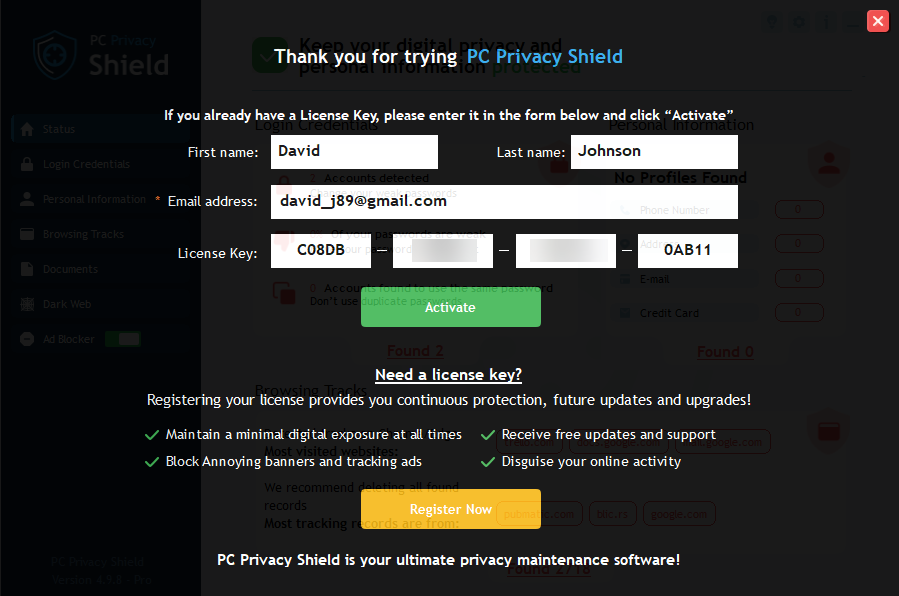
PC Privacy Shield is designed for simplicity and ease of use. All you need to do is register online or over the phone. Enter the activation code as described below.

1. Click on the Register Now Button in the lower right corner of the application.

The wizard will take you through registration process, during which PC Privacy Shield will show pop-up screen with an activation code box.

2. Complete the Registration Process.

Follow the on-screen instructions.

3. Copy & Paste the activation code into the activation box.

Copy the activation code you received into the activation box and click the Activation button to complete the activation process.
Mobile PC Privacy Shield

For detailed support and information about Mobile Privacy Shield please click here.

Frequently Asked Questions about PC Privacy Shield

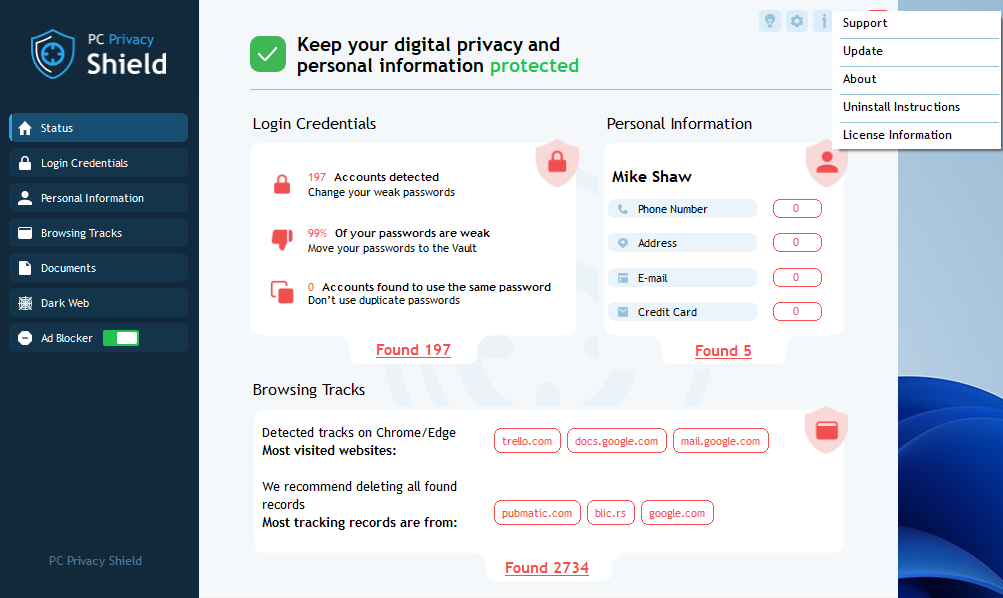
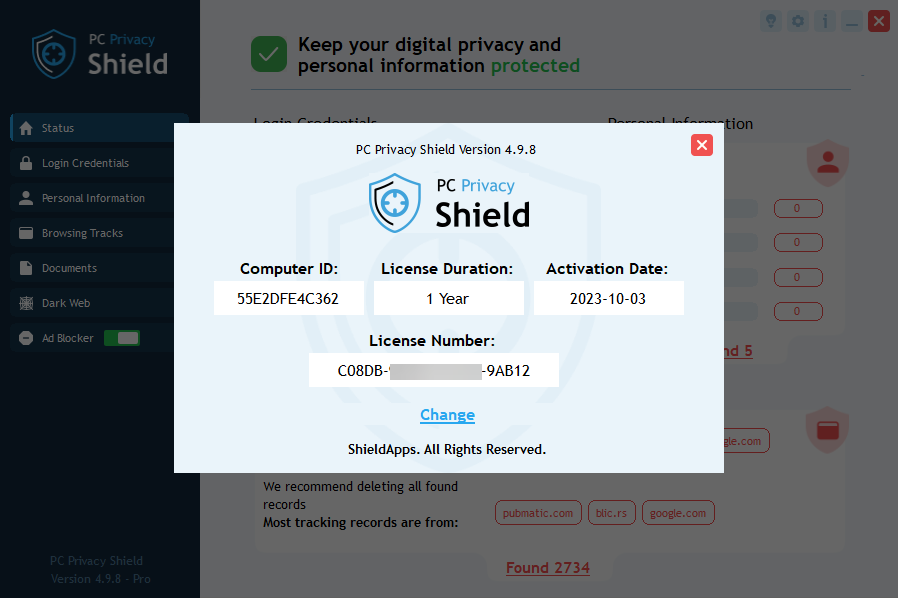
PC Privacy Shield is a Privacy Protection application designed to provide users with maximum privacy protection. This software is developed to allow even non-technical users a set of tools that will keep their device clean from any online and offline activity.You need Privacy Protection Software because most home users maintain an active online life, storing online activity locally on their hard drive without awareness. These 'Digital Fingerprints' are targets for privacy hackers, criminals, identity thieves, tracking companies, and data miners. Software like PC Privacy Shield allows users to keep private information private, ensuring no one knows their online activities, personal details, or chat content.PC Privacy Shield provides both a deep scan and analysis service, alongside cleaning and data protection. The scan feature offers users a detailed report of exposed files stored locally on their hard disk, enabling them to protect private data. The cleaning function deletes selected digital fingerprints that could potentially expose user privacy and identity.PC Privacy Shield works by reporting in detail any exposed files, information, or data on your PC. Once reported, these files and records can be deleted from your system or, in some cases, replaced to provide misleading or false information.PC Privacy Shield is free to try. The trial period includes several features, though not all are included in the premium version.To activate your license, click the 'Register Now' button in the lower right corner of the application's home screen. This will open a registration and license window. If you have a license key, fill in your first and last name, the email for notifications, and the license number key you received. After filling the form, click 'Activate.' A confirmation will be received. Exit the window by clicking the cross in the upper right screen to continue using the software.To upgrade your free version to Premium, you need to purchase the Premium version for $39.99 per year. This can be done in several ways: On the website, click the 'Register Now' button on the PC Privacy webpage (next to the download button). A new tab or window will open, asking for your information to place an order, and the key will be sent to your email. Within the software, click the 'Register Now' button in the lower right corner of the screen. This opens a window to insert and activate the license key, or to register a Premium version, which will open a new browser tab/window for you to fill in information and place an order, with the license key arriving via email.You can find your license information and its expiration date by clicking the ‘i’ icon at the top right corner of the software, then selecting ‘License Information’.Installing PC Privacy Shield is an easy process. You simply need to download the PC Privacy Shield file from our website and initiate the installation, which will guide you through the process. More detailed information is available in the text above.If your PC Privacy Shield installation does not delete any entries, it is likely because you are using the free version. To clean digital fingerprints and maintain a safe status, a Premium version is required.A PC Privacy Shield license protects a single PC device/laptop. For more than one key, bulk discounts, or a business version, please contact us directly via the form below for assistance.If you accidentally click delete but do not want some data deleted, PC Privacy Shield will ask for deletion confirmation each time you attempt to delete files. However, be aware that once the process is confirmed, files cannot be restored.PC Privacy Shield supports most distributed Skype versions up to 7.41.

PC Privacy Shield is a Privacy Protection application designed to provide users with maximum privacy protection. This software is developed to allow even non-technical users a set of tools that will keep their device clean from any online and offline activity.You need Privacy Protection Software because most home users maintain an active online life, storing online activity locally on their hard drive without awareness. These 'Digital Fingerprints' are targets for privacy hackers, criminals, identity thieves, tracking companies, and data miners. Software like PC Privacy Shield allows users to keep private information private, ensuring no one knows their online activities, personal details, or chat content.PC Privacy Shield provides both a deep scan and analysis service, alongside cleaning and data protection. The scan feature offers users a detailed report of exposed files stored locally on their hard disk, enabling them to protect private data. The cleaning function deletes selected digital fingerprints that could potentially expose user privacy and identity.PC Privacy Shield works by reporting in detail any exposed files, information, or data on your PC. Once reported, these files and records can be deleted from your system or, in some cases, replaced to provide misleading or false information.PC Privacy Shield is free to try. The trial period includes several features, though not all are included in the premium version.To activate your license, click the 'Register Now' button in the lower right corner of the application's home screen. This will open a registration and license window. If you have a license key, fill in your first and last name, the email for notifications, and the license number key you received. After filling the form, click 'Activate.' A confirmation will be received. Exit the window by clicking the cross in the upper right screen to continue using the software.To upgrade your free version to Premium, you need to purchase the Premium version for $39.99 per year. This can be done in several ways: On the website, click the 'Register Now' button on the PC Privacy webpage (next to the download button). A new tab or window will open, asking for your information to place an order, and the key will be sent to your email. Within the software, click the 'Register Now' button in the lower right corner of the screen. This opens a window to insert and activate the license key, or to register a Premium version, which will open a new browser tab/window for you to fill in information and place an order, with the license key arriving via email.You can find your license information and its expiration date by clicking the ‘i’ icon at the top right corner of the software, then selecting ‘License Information’.Installing PC Privacy Shield is an easy process. You simply need to download the PC Privacy Shield file from our website and initiate the installation, which will guide you through the process. More detailed information is available in the text above.If your PC Privacy Shield installation does not delete any entries, it is likely because you are using the free version. To clean digital fingerprints and maintain a safe status, a Premium version is required.A PC Privacy Shield license protects a single PC device/laptop. For more than one key, bulk discounts, or a business version, please contact us directly via the form below for assistance.If you accidentally click delete but do not want some data deleted, PC Privacy Shield will ask for deletion confirmation each time you attempt to delete files. However, be aware that once the process is confirmed, files cannot be restored.PC Privacy Shield supports most distributed Skype versions up to 7.41.

PC Privacy Shield is a Privacy Protection application designed to provide users with maximum privacy protection. This software is developed to allow even non-technical users a set of tools that will keep their device clean from any online and offline activity.You need Privacy Protection Software because most home users maintain an active online life, storing online activity locally on their hard drive without awareness. These 'Digital Fingerprints' are targets for privacy hackers, criminals, identity thieves, tracking companies, and data miners. Software like PC Privacy Shield allows users to keep private information private, ensuring no one knows their online activities, personal details, or chat content.PC Privacy Shield provides both a deep scan and analysis service, alongside cleaning and data protection. The scan feature offers users a detailed report of exposed files stored locally on their hard disk, enabling them to protect private data. The cleaning function deletes selected digital fingerprints that could potentially expose user privacy and identity.PC Privacy Shield works by reporting in detail any exposed files, information, or data on your PC. Once reported, these files and records can be deleted from your system or, in some cases, replaced to provide misleading or false information.PC Privacy Shield is free to try. The trial period includes several features, though not all are included in the premium version.To activate your license, click the 'Register Now' button in the lower right corner of the application's home screen. This will open a registration and license window. If you have a license key, fill in your first and last name, the email for notifications, and the license number key you received. After filling the form, click 'Activate.' A confirmation will be received. Exit the window by clicking the cross in the upper right screen to continue using the software.To upgrade your free version to Premium, you need to purchase the Premium version for $39.99 per year. This can be done in several ways: On the website, click the 'Register Now' button on the PC Privacy webpage (next to the download button). A new tab or window will open, asking for your information to place an order, and the key will be sent to your email. Within the software, click the 'Register Now' button in the lower right corner of the screen. This opens a window to insert and activate the license key, or to register a Premium version, which will open a new browser tab/window for you to fill in information and place an order, with the license key arriving via email.You can find your license information and its expiration date by clicking the ‘i’ icon at the top right corner of the software, then selecting ‘License Information’.Installing PC Privacy Shield is an easy process. You simply need to download the PC Privacy Shield file from our website and initiate the installation, which will guide you through the process. More detailed information is available in the text above.If your PC Privacy Shield installation does not delete any entries, it is likely because you are using the free version. To clean digital fingerprints and maintain a safe status, a Premium version is required.A PC Privacy Shield license protects a single PC device/laptop. For more than one key, bulk discounts, or a business version, please contact us directly via the form below for assistance.If you accidentally click delete but do not want some data deleted, PC Privacy Shield will ask for deletion confirmation each time you attempt to delete files. However, be aware that once the process is confirmed, files cannot be restored.PC Privacy Shield supports most distributed Skype versions up to 7.41.

PC Privacy Shield is a Privacy Protection application designed to provide users with maximum privacy protection. This software is developed to allow even non-technical users a set of tools that will keep their device clean from any online and offline activity.You need Privacy Protection Software because most home users maintain an active online life, storing online activity locally on their hard drive without awareness. These 'Digital Fingerprints' are targets for privacy hackers, criminals, identity thieves, tracking companies, and data miners. Software like PC Privacy Shield allows users to keep private information private, ensuring no one knows their online activities, personal details, or chat content.PC Privacy Shield provides both a deep scan and analysis service, alongside cleaning and data protection. The scan feature offers users a detailed report of exposed files stored locally on their hard disk, enabling them to protect private data. The cleaning function deletes selected digital fingerprints that could potentially expose user privacy and identity.PC Privacy Shield works by reporting in detail any exposed files, information, or data on your PC. Once reported, these files and records can be deleted from your system or, in some cases, replaced to provide misleading or false information.PC Privacy Shield is free to try. The trial period includes several features, though not all are included in the premium version.To activate your license, click the 'Register Now' button in the lower right corner of the application's home screen. This will open a registration and license window. If you have a license key, fill in your first and last name, the email for notifications, and the license number key you received. After filling the form, click 'Activate.' A confirmation will be received. Exit the window by clicking the cross in the upper right screen to continue using the software.To upgrade your free version to Premium, you need to purchase the Premium version for $39.99 per year. This can be done in several ways: On the website, click the 'Register Now' button on the PC Privacy webpage (next to the download button). A new tab or window will open, asking for your information to place an order, and the key will be sent to your email. Within the software, click the 'Register Now' button in the lower right corner of the screen. This opens a window to insert and activate the license key, or to register a Premium version, which will open a new browser tab/window for you to fill in information and place an order, with the license key arriving via email.You can find your license information and its expiration date by clicking the ‘i’ icon at the top right corner of the software, then selecting ‘License Information’.Installing PC Privacy Shield is an easy process. You simply need to download the PC Privacy Shield file from our website and initiate the installation, which will guide you through the process. More detailed information is available in the text above.If your PC Privacy Shield installation does not delete any entries, it is likely because you are using the free version. To clean digital fingerprints and maintain a safe status, a Premium version is required.A PC Privacy Shield license protects a single PC device/laptop. For more than one key, bulk discounts, or a business version, please contact us directly via the form below for assistance.If you accidentally click delete but do not want some data deleted, PC Privacy Shield will ask for deletion confirmation each time you attempt to delete files. However, be aware that once the process is confirmed, files cannot be restored.PC Privacy Shield supports most distributed Skype versions up to 7.41.

PC Privacy Shield is a Privacy Protection application designed to provide users with maximum privacy protection. This software is developed to allow even non-technical users a set of tools that will keep their device clean from any online and offline activity.You need Privacy Protection Software because most home users maintain an active online life, storing online activity locally on their hard drive without awareness. These 'Digital Fingerprints' are targets for privacy hackers, criminals, identity thieves, tracking companies, and data miners. Software like PC Privacy Shield allows users to keep private information private, ensuring no one knows their online activities, personal details, or chat content.PC Privacy Shield provides both a deep scan and analysis service, alongside cleaning and data protection. The scan feature offers users a detailed report of exposed files stored locally on their hard disk, enabling them to protect private data. The cleaning function deletes selected digital fingerprints that could potentially expose user privacy and identity.PC Privacy Shield works by reporting in detail any exposed files, information, or data on your PC. Once reported, these files and records can be deleted from your system or, in some cases, replaced to provide misleading or false information.PC Privacy Shield is free to try. The trial period includes several features, though not all are included in the premium version.To activate your license, click the 'Register Now' button in the lower right corner of the application's home screen. This will open a registration and license window. If you have a license key, fill in your first and last name, the email for notifications, and the license number key you received. After filling the form, click 'Activate.' A confirmation will be received. Exit the window by clicking the cross in the upper right screen to continue using the software.To upgrade your free version to Premium, you need to purchase the Premium version for $39.99 per year. This can be done in several ways: On the website, click the 'Register Now' button on the PC Privacy webpage (next to the download button). A new tab or window will open, asking for your information to place an order, and the key will be sent to your email. Within the software, click the 'Register Now' button in the lower right corner of the screen. This opens a window to insert and activate the license key, or to register a Premium version, which will open a new browser tab/window for you to fill in information and place an order, with the license key arriving via email.You can find your license information and its expiration date by clicking the ‘i’ icon at the top right corner of the software, then selecting ‘License Information’.Installing PC Privacy Shield is an easy process. You simply need to download the PC Privacy Shield file from our website and initiate the installation, which will guide you through the process. More detailed information is available in the text above.If your PC Privacy Shield installation does not delete any entries, it is likely because you are using the free version. To clean digital fingerprints and maintain a safe status, a Premium version is required.A PC Privacy Shield license protects a single PC device/laptop. For more than one key, bulk discounts, or a business version, please contact us directly via the form below for assistance.If you accidentally click delete but do not want some data deleted, PC Privacy Shield will ask for deletion confirmation each time you attempt to delete files. However, be aware that once the process is confirmed, files cannot be restored.PC Privacy Shield supports most distributed Skype versions up to 7.41.

PC Privacy Shield is a Privacy Protection application designed to provide users with maximum privacy protection. This software is developed to allow even non-technical users a set of tools that will keep their device clean from any online and offline activity.You need Privacy Protection Software because most home users maintain an active online life, storing online activity locally on their hard drive without awareness. These 'Digital Fingerprints' are targets for privacy hackers, criminals, identity thieves, tracking companies, and data miners. Software like PC Privacy Shield allows users to keep private information private, ensuring no one knows their online activities, personal details, or chat content.PC Privacy Shield provides both a deep scan and analysis service, alongside cleaning and data protection. The scan feature offers users a detailed report of exposed files stored locally on their hard disk, enabling them to protect private data. The cleaning function deletes selected digital fingerprints that could potentially expose user privacy and identity.PC Privacy Shield works by reporting in detail any exposed files, information, or data on your PC. Once reported, these files and records can be deleted from your system or, in some cases, replaced to provide misleading or false information.PC Privacy Shield is free to try. The trial period includes several features, though not all are included in the premium version.To activate your license, click the 'Register Now' button in the lower right corner of the application's home screen. This will open a registration and license window. If you have a license key, fill in your first and last name, the email for notifications, and the license number key you received. After filling the form, click 'Activate.' A confirmation will be received. Exit the window by clicking the cross in the upper right screen to continue using the software.To upgrade your free version to Premium, you need to purchase the Premium version for $39.99 per year. This can be done in several ways: On the website, click the 'Register Now' button on the PC Privacy webpage (next to the download button). A new tab or window will open, asking for your information to place an order, and the key will be sent to your email. Within the software, click the 'Register Now' button in the lower right corner of the screen. This opens a window to insert and activate the license key, or to register a Premium version, which will open a new browser tab/window for you to fill in information and place an order, with the license key arriving via email.You can find your license information and its expiration date by clicking the ‘i’ icon at the top right corner of the software, then selecting ‘License Information’.Installing PC Privacy Shield is an easy process. You simply need to download the PC Privacy Shield file from our website and initiate the installation, which will guide you through the process. More detailed information is available in the text above.If your PC Privacy Shield installation does not delete any entries, it is likely because you are using the free version. To clean digital fingerprints and maintain a safe status, a Premium version is required.A PC Privacy Shield license protects a single PC device/laptop. For more than one key, bulk discounts, or a business version, please contact us directly via the form below for assistance.If you accidentally click delete but do not want some data deleted, PC Privacy Shield will ask for deletion confirmation each time you attempt to delete files. However, be aware that once the process is confirmed, files cannot be restored.PC Privacy Shield supports most distributed Skype versions up to 7.41.

PC Privacy Shield is a Privacy Protection application designed to provide users with maximum privacy protection. This software is developed to allow even non-technical users a set of tools that will keep their device clean from any online and offline activity.You need Privacy Protection Software because most home users maintain an active online life, storing online activity locally on their hard drive without awareness. These 'Digital Fingerprints' are targets for privacy hackers, criminals, identity thieves, tracking companies, and data miners. Software like PC Privacy Shield allows users to keep private information private, ensuring no one knows their online activities, personal details, or chat content.PC Privacy Shield provides both a deep scan and analysis service, alongside cleaning and data protection. The scan feature offers users a detailed report of exposed files stored locally on their hard disk, enabling them to protect private data. The cleaning function deletes selected digital fingerprints that could potentially expose user privacy and identity.PC Privacy Shield works by reporting in detail any exposed files, information, or data on your PC. Once reported, these files and records can be deleted from your system or, in some cases, replaced to provide misleading or false information.PC Privacy Shield is free to try. The trial period includes several features, though not all are included in the premium version.To activate your license, click the 'Register Now' button in the lower right corner of the application's home screen. This will open a registration and license window. If you have a license key, fill in your first and last name, the email for notifications, and the license number key you received. After filling the form, click 'Activate.' A confirmation will be received. Exit the window by clicking the cross in the upper right screen to continue using the software.To upgrade your free version to Premium, you need to purchase the Premium version for $39.99 per year. This can be done in several ways: On the website, click the 'Register Now' button on the PC Privacy webpage (next to the download button). A new tab or window will open, asking for your information to place an order, and the key will be sent to your email. Within the software, click the 'Register Now' button in the lower right corner of the screen. This opens a window to insert and activate the license key, or to register a Premium version, which will open a new browser tab/window for you to fill in information and place an order, with the license key arriving via email.You can find your license information and its expiration date by clicking the ‘i’ icon at the top right corner of the software, then selecting ‘License Information’.Installing PC Privacy Shield is an easy process. You simply need to download the PC Privacy Shield file from our website and initiate the installation, which will guide you through the process. More detailed information is available in the text above.If your PC Privacy Shield installation does not delete any entries, it is likely because you are using the free version. To clean digital fingerprints and maintain a safe status, a Premium version is required.A PC Privacy Shield license protects a single PC device/laptop. For more than one key, bulk discounts, or a business version, please contact us directly via the form below for assistance.If you accidentally click delete but do not want some data deleted, PC Privacy Shield will ask for deletion confirmation each time you attempt to delete files. However, be aware that once the process is confirmed, files cannot be restored.PC Privacy Shield supports most distributed Skype versions up to 7.41.

PC Privacy Shield is a Privacy Protection application designed to provide users with maximum privacy protection. This software is developed to allow even non-technical users a set of tools that will keep their device clean from any online and offline activity.You need Privacy Protection Software because most home users maintain an active online life, storing online activity locally on their hard drive without awareness. These 'Digital Fingerprints' are targets for privacy hackers, criminals, identity thieves, tracking companies, and data miners. Software like PC Privacy Shield allows users to keep private information private, ensuring no one knows their online activities, personal details, or chat content.PC Privacy Shield provides both a deep scan and analysis service, alongside cleaning and data protection. The scan feature offers users a detailed report of exposed files stored locally on their hard disk, enabling them to protect private data. The cleaning function deletes selected digital fingerprints that could potentially expose user privacy and identity.PC Privacy Shield works by reporting in detail any exposed files, information, or data on your PC. Once reported, these files and records can be deleted from your system or, in some cases, replaced to provide misleading or false information.PC Privacy Shield is free to try. The trial period includes several features, though not all are included in the premium version.To activate your license, click the 'Register Now' button in the lower right corner of the application's home screen. This will open a registration and license window. If you have a license key, fill in your first and last name, the email for notifications, and the license number key you received. After filling the form, click 'Activate.' A confirmation will be received. Exit the window by clicking the cross in the upper right screen to continue using the software.To upgrade your free version to Premium, you need to purchase the Premium version for $39.99 per year. This can be done in several ways: On the website, click the 'Register Now' button on the PC Privacy webpage (next to the download button). A new tab or window will open, asking for your information to place an order, and the key will be sent to your email. Within the software, click the 'Register Now' button in the lower right corner of the screen. This opens a window to insert and activate the license key, or to register a Premium version, which will open a new browser tab/window for you to fill in information and place an order, with the license key arriving via email.You can find your license information and its expiration date by clicking the ‘i’ icon at the top right corner of the software, then selecting ‘License Information’.Installing PC Privacy Shield is an easy process. You simply need to download the PC Privacy Shield file from our website and initiate the installation, which will guide you through the process. More detailed information is available in the text above.If your PC Privacy Shield installation does not delete any entries, it is likely because you are using the free version. To clean digital fingerprints and maintain a safe status, a Premium version is required.A PC Privacy Shield license protects a single PC device/laptop. For more than one key, bulk discounts, or a business version, please contact us directly via the form below for assistance.If you accidentally click delete but do not want some data deleted, PC Privacy Shield will ask for deletion confirmation each time you attempt to delete files. However, be aware that once the process is confirmed, files cannot be restored.PC Privacy Shield supports most distributed Skype versions up to 7.41.

PC Privacy Shield is a Privacy Protection application designed to provide users with maximum privacy protection. This software is developed to allow even non-technical users a set of tools that will keep their device clean from any online and offline activity.You need Privacy Protection Software because most home users maintain an active online life, storing online activity locally on their hard drive without awareness. These 'Digital Fingerprints' are targets for privacy hackers, criminals, identity thieves, tracking companies, and data miners. Software like PC Privacy Shield allows users to keep private information private, ensuring no one knows their online activities, personal details, or chat content.PC Privacy Shield provides both a deep scan and analysis service, alongside cleaning and data protection. The scan feature offers users a detailed report of exposed files stored locally on their hard disk, enabling them to protect private data. The cleaning function deletes selected digital fingerprints that could potentially expose user privacy and identity.PC Privacy Shield works by reporting in detail any exposed files, information, or data on your PC. Once reported, these files and records can be deleted from your system or, in some cases, replaced to provide misleading or false information.PC Privacy Shield is free to try. The trial period includes several features, though not all are included in the premium version.To activate your license, click the 'Register Now' button in the lower right corner of the application's home screen. This will open a registration and license window. If you have a license key, fill in your first and last name, the email for notifications, and the license number key you received. After filling the form, click 'Activate.' A confirmation will be received. Exit the window by clicking the cross in the upper right screen to continue using the software.To upgrade your free version to Premium, you need to purchase the Premium version for $39.99 per year. This can be done in several ways: On the website, click the 'Register Now' button on the PC Privacy webpage (next to the download button). A new tab or window will open, asking for your information to place an order, and the key will be sent to your email. Within the software, click the 'Register Now' button in the lower right corner of the screen. This opens a window to insert and activate the license key, or to register a Premium version, which will open a new browser tab/window for you to fill in information and place an order, with the license key arriving via email.You can find your license information and its expiration date by clicking the ‘i’ icon at the top right corner of the software, then selecting ‘License Information’.Installing PC Privacy Shield is an easy process. You simply need to download the PC Privacy Shield file from our website and initiate the installation, which will guide you through the process. More detailed information is available in the text above.If your PC Privacy Shield installation does not delete any entries, it is likely because you are using the free version. To clean digital fingerprints and maintain a safe status, a Premium version is required.A PC Privacy Shield license protects a single PC device/laptop. For more than one key, bulk discounts, or a business version, please contact us directly via the form below for assistance.If you accidentally click delete but do not want some data deleted, PC Privacy Shield will ask for deletion confirmation each time you attempt to delete files. However, be aware that once the process is confirmed, files cannot be restored.PC Privacy Shield supports most distributed Skype versions up to 7.41.

PC Privacy Shield is a Privacy Protection application designed to provide users with maximum privacy protection. This software is developed to allow even non-technical users a set of tools that will keep their device clean from any online and offline activity.You need Privacy Protection Software because most home users maintain an active online life, storing online activity locally on their hard drive without awareness. These 'Digital Fingerprints' are targets for privacy hackers, criminals, identity thieves, tracking companies, and data miners. Software like PC Privacy Shield allows users to keep private information private, ensuring no one knows their online activities, personal details, or chat content.PC Privacy Shield provides both a deep scan and analysis service, alongside cleaning and data protection. The scan feature offers users a detailed report of exposed files stored locally on their hard disk, enabling them to protect private data. The cleaning function deletes selected digital fingerprints that could potentially expose user privacy and identity.PC Privacy Shield works by reporting in detail any exposed files, information, or data on your PC. Once reported, these files and records can be deleted from your system or, in some cases, replaced to provide misleading or false information.PC Privacy Shield is free to try. The trial period includes several features, though not all are included in the premium version.To activate your license, click the 'Register Now' button in the lower right corner of the application's home screen. This will open a registration and license window. If you have a license key, fill in your first and last name, the email for notifications, and the license number key you received. After filling the form, click 'Activate.' A confirmation will be received. Exit the window by clicking the cross in the upper right screen to continue using the software.To upgrade your free version to Premium, you need to purchase the Premium version for $39.99 per year. This can be done in several ways: On the website, click the 'Register Now' button on the PC Privacy webpage (next to the download button). A new tab or window will open, asking for your information to place an order, and the key will be sent to your email. Within the software, click the 'Register Now' button in the lower right corner of the screen. This opens a window to insert and activate the license key, or to register a Premium version, which will open a new browser tab/window for you to fill in information and place an order, with the license key arriving via email.You can find your license information and its expiration date by clicking the ‘i’ icon at the top right corner of the software, then selecting ‘License Information’.Installing PC Privacy Shield is an easy process. You simply need to download the PC Privacy Shield file from our website and initiate the installation, which will guide you through the process. More detailed information is available in the text above.If your PC Privacy Shield installation does not delete any entries, it is likely because you are using the free version. To clean digital fingerprints and maintain a safe status, a Premium version is required.A PC Privacy Shield license protects a single PC device/laptop. For more than one key, bulk discounts, or a business version, please contact us directly via the form below for assistance.If you accidentally click delete but do not want some data deleted, PC Privacy Shield will ask for deletion confirmation each time you attempt to delete files. However, be aware that once the process is confirmed, files cannot be restored.PC Privacy Shield supports most distributed Skype versions up to 7.41.

PC Privacy Shield is a Privacy Protection application designed to provide users with maximum privacy protection. This software is developed to allow even non-technical users a set of tools that will keep their device clean from any online and offline activity.You need Privacy Protection Software because most home users maintain an active online life, storing online activity locally on their hard drive without awareness. These 'Digital Fingerprints' are targets for privacy hackers, criminals, identity thieves, tracking companies, and data miners. Software like PC Privacy Shield allows users to keep private information private, ensuring no one knows their online activities, personal details, or chat content.PC Privacy Shield provides both a deep scan and analysis service, alongside cleaning and data protection. The scan feature offers users a detailed report of exposed files stored locally on their hard disk, enabling them to protect private data. The cleaning function deletes selected digital fingerprints that could potentially expose user privacy and identity.PC Privacy Shield works by reporting in detail any exposed files, information, or data on your PC. Once reported, these files and records can be deleted from your system or, in some cases, replaced to provide misleading or false information.PC Privacy Shield is free to try. The trial period includes several features, though not all are included in the premium version.To activate your license, click the 'Register Now' button in the lower right corner of the application's home screen. This will open a registration and license window. If you have a license key, fill in your first and last name, the email for notifications, and the license number key you received. After filling the form, click 'Activate.' A confirmation will be received. Exit the window by clicking the cross in the upper right screen to continue using the software.To upgrade your free version to Premium, you need to purchase the Premium version for $39.99 per year. This can be done in several ways: On the website, click the 'Register Now' button on the PC Privacy webpage (next to the download button). A new tab or window will open, asking for your information to place an order, and the key will be sent to your email. Within the software, click the 'Register Now' button in the lower right corner of the screen. This opens a window to insert and activate the license key, or to register a Premium version, which will open a new browser tab/window for you to fill in information and place an order, with the license key arriving via email.You can find your license information and its expiration date by clicking the ‘i’ icon at the top right corner of the software, then selecting ‘License Information’.Installing PC Privacy Shield is an easy process. You simply need to download the PC Privacy Shield file from our website and initiate the installation, which will guide you through the process. More detailed information is available in the text above.If your PC Privacy Shield installation does not delete any entries, it is likely because you are using the free version. To clean digital fingerprints and maintain a safe status, a Premium version is required.A PC Privacy Shield license protects a single PC device/laptop. For more than one key, bulk discounts, or a business version, please contact us directly via the form below for assistance.If you accidentally click delete but do not want some data deleted, PC Privacy Shield will ask for deletion confirmation each time you attempt to delete files. However, be aware that once the process is confirmed, files cannot be restored.PC Privacy Shield supports most distributed Skype versions up to 7.41.

PC Privacy Shield is a Privacy Protection application designed to provide users with maximum privacy protection. This software is developed to allow even non-technical users a set of tools that will keep their device clean from any online and offline activity.You need Privacy Protection Software because most home users maintain an active online life, storing online activity locally on their hard drive without awareness. These 'Digital Fingerprints' are targets for privacy hackers, criminals, identity thieves, tracking companies, and data miners. Software like PC Privacy Shield allows users to keep private information private, ensuring no one knows their online activities, personal details, or chat content.PC Privacy Shield provides both a deep scan and analysis service, alongside cleaning and data protection. The scan feature offers users a detailed report of exposed files stored locally on their hard disk, enabling them to protect private data. The cleaning function deletes selected digital fingerprints that could potentially expose user privacy and identity.PC Privacy Shield works by reporting in detail any exposed files, information, or data on your PC. Once reported, these files and records can be deleted from your system or, in some cases, replaced to provide misleading or false information.PC Privacy Shield is free to try. The trial period includes several features, though not all are included in the premium version.To activate your license, click the 'Register Now' button in the lower right corner of the application's home screen. This will open a registration and license window. If you have a license key, fill in your first and last name, the email for notifications, and the license number key you received. After filling the form, click 'Activate.' A confirmation will be received. Exit the window by clicking the cross in the upper right screen to continue using the software.To upgrade your free version to Premium, you need to purchase the Premium version for $39.99 per year. This can be done in several ways: On the website, click the 'Register Now' button on the PC Privacy webpage (next to the download button). A new tab or window will open, asking for your information to place an order, and the key will be sent to your email. Within the software, click the 'Register Now' button in the lower right corner of the screen. This opens a window to insert and activate the license key, or to register a Premium version, which will open a new browser tab/window for you to fill in information and place an order, with the license key arriving via email.You can find your license information and its expiration date by clicking the ‘i’ icon at the top right corner of the software, then selecting ‘License Information’.Installing PC Privacy Shield is an easy process. You simply need to download the PC Privacy Shield file from our website and initiate the installation, which will guide you through the process. More detailed information is available in the text above.If your PC Privacy Shield installation does not delete any entries, it is likely because you are using the free version. To clean digital fingerprints and maintain a safe status, a Premium version is required.A PC Privacy Shield license protects a single PC device/laptop. For more than one key, bulk discounts, or a business version, please contact us directly via the form below for assistance.If you accidentally click delete but do not want some data deleted, PC Privacy Shield will ask for deletion confirmation each time you attempt to delete files. However, be aware that once the process is confirmed, files cannot be restored.PC Privacy Shield supports most distributed Skype versions up to 7.41.

PC Privacy Shield is a Privacy Protection application designed to provide users with maximum privacy protection. This software is developed to allow even non-technical users a set of tools that will keep their device clean from any online and offline activity.You need Privacy Protection Software because most home users maintain an active online life, storing online activity locally on their hard drive without awareness. These 'Digital Fingerprints' are targets for privacy hackers, criminals, identity thieves, tracking companies, and data miners. Software like PC Privacy Shield allows users to keep private information private, ensuring no one knows their online activities, personal details, or chat content.PC Privacy Shield provides both a deep scan and analysis service, alongside cleaning and data protection. The scan feature offers users a detailed report of exposed files stored locally on their hard disk, enabling them to protect private data. The cleaning function deletes selected digital fingerprints that could potentially expose user privacy and identity.PC Privacy Shield works by reporting in detail any exposed files, information, or data on your PC. Once reported, these files and records can be deleted from your system or, in some cases, replaced to provide misleading or false information.PC Privacy Shield is free to try. The trial period includes several features, though not all are included in the premium version.To activate your license, click the 'Register Now' button in the lower right corner of the application's home screen. This will open a registration and license window. If you have a license key, fill in your first and last name, the email for notifications, and the license number key you received. After filling the form, click 'Activate.' A confirmation will be received. Exit the window by clicking the cross in the upper right screen to continue using the software.To upgrade your free version to Premium, you need to purchase the Premium version for $39.99 per year. This can be done in several ways: On the website, click the 'Register Now' button on the PC Privacy webpage (next to the download button). A new tab or window will open, asking for your information to place an order, and the key will be sent to your email. Within the software, click the 'Register Now' button in the lower right corner of the screen. This opens a window to insert and activate the license key, or to register a Premium version, which will open a new browser tab/window for you to fill in information and place an order, with the license key arriving via email.You can find your license information and its expiration date by clicking the ‘i’ icon at the top right corner of the software, then selecting ‘License Information’.Installing PC Privacy Shield is an easy process. You simply need to download the PC Privacy Shield file from our website and initiate the installation, which will guide you through the process. More detailed information is available in the text above.If your PC Privacy Shield installation does not delete any entries, it is likely because you are using the free version. To clean digital fingerprints and maintain a safe status, a Premium version is required.A PC Privacy Shield license protects a single PC device/laptop. For more than one key, bulk discounts, or a business version, please contact us directly via the form below for assistance.If you accidentally click delete but do not want some data deleted, PC Privacy Shield will ask for deletion confirmation each time you attempt to delete files. However, be aware that once the process is confirmed, files cannot be restored.PC Privacy Shield supports most distributed Skype versions up to 7.41.

PC Privacy Shield is a Privacy Protection application designed to provide users with maximum privacy protection. This software is developed to allow even non-technical users a set of tools that will keep their device clean from any online and offline activity.You need Privacy Protection Software because most home users maintain an active online life, storing online activity locally on their hard drive without awareness. These 'Digital Fingerprints' are targets for privacy hackers, criminals, identity thieves, tracking companies, and data miners. Software like PC Privacy Shield allows users to keep private information private, ensuring no one knows their online activities, personal details, or chat content.PC Privacy Shield provides both a deep scan and analysis service, alongside cleaning and data protection. The scan feature offers users a detailed report of exposed files stored locally on their hard disk, enabling them to protect private data. The cleaning function deletes selected digital fingerprints that could potentially expose user privacy and identity.PC Privacy Shield works by reporting in detail any exposed files, information, or data on your PC. Once reported, these files and records can be deleted from your system or, in some cases, replaced to provide misleading or false information.PC Privacy Shield is free to try. The trial period includes several features, though not all are included in the premium version.To activate your license, click the 'Register Now' button in the lower right corner of the application's home screen. This will open a registration and license window. If you have a license key, fill in your first and last name, the email for notifications, and the license number key you received. After filling the form, click 'Activate.' A confirmation will be received. Exit the window by clicking the cross in the upper right screen to continue using the software.To upgrade your free version to Premium, you need to purchase the Premium version for $39.99 per year. This can be done in several ways: On the website, click the 'Register Now' button on the PC Privacy webpage (next to the download button). A new tab or window will open, asking for your information to place an order, and the key will be sent to your email. Within the software, click the 'Register Now' button in the lower right corner of the screen. This opens a window to insert and activate the license key, or to register a Premium version, which will open a new browser tab/window for you to fill in information and place an order, with the license key arriving via email.You can find your license information and its expiration date by clicking the ‘i’ icon at the top right corner of the software, then selecting ‘License Information’.Installing PC Privacy Shield is an easy process. You simply need to download the PC Privacy Shield file from our website and initiate the installation, which will guide you through the process. More detailed information is available in the text above.If your PC Privacy Shield installation does not delete any entries, it is likely because you are using the free version. To clean digital fingerprints and maintain a safe status, a Premium version is required.A PC Privacy Shield license protects a single PC device/laptop. For more than one key, bulk discounts, or a business version, please contact us directly via the form below for assistance.If you accidentally click delete but do not want some data deleted, PC Privacy Shield will ask for deletion confirmation each time you attempt to delete files. However, be aware that once the process is confirmed, files cannot be restored.PC Privacy Shield supports most distributed Skype versions up to 7.41.

PC Privacy Shield is a Privacy Protection application designed to provide users with maximum privacy protection. This software is developed to allow even non-technical users a set of tools that will keep their device clean from any online and offline activity.You need Privacy Protection Software because most home users maintain an active online life, storing online activity locally on their hard drive without awareness. These 'Digital Fingerprints' are targets for privacy hackers, criminals, identity thieves, tracking companies, and data miners. Software like PC Privacy Shield allows users to keep private information private, ensuring no one knows their online activities, personal details, or chat content.PC Privacy Shield provides both a deep scan and analysis service, alongside cleaning and data protection. The scan feature offers users a detailed report of exposed files stored locally on their hard disk, enabling them to protect private data. The cleaning function deletes selected digital fingerprints that could potentially expose user privacy and identity.PC Privacy Shield works by reporting in detail any exposed files, information, or data on your PC. Once reported, these files and records can be deleted from your system or, in some cases, replaced to provide misleading or false information.PC Privacy Shield is free to try. The trial period includes several features, though not all are included in the premium version.To activate your license, click the 'Register Now' button in the lower right corner of the application's home screen. This will open a registration and license window. If you have a license key, fill in your first and last name, the email for notifications, and the license number key you received. After filling the form, click 'Activate.' A confirmation will be received. Exit the window by clicking the cross in the upper right screen to continue using the software.To upgrade your free version to Premium, you need to purchase the Premium version for $39.99 per year. This can be done in several ways: On the website, click the 'Register Now' button on the PC Privacy webpage (next to the download button). A new tab or window will open, asking for your information to place an order, and the key will be sent to your email. Within the software, click the 'Register Now' button in the lower right corner of the screen. This opens a window to insert and activate the license key, or to register a Premium version, which will open a new browser tab/window for you to fill in information and place an order, with the license key arriving via email.You can find your license information and its expiration date by clicking the ‘i’ icon at the top right corner of the software, then selecting ‘License Information’.Installing PC Privacy Shield is an easy process. You simply need to download the PC Privacy Shield file from our website and initiate the installation, which will guide you through the process. More detailed information is available in the text above.If your PC Privacy Shield installation does not delete any entries, it is likely because you are using the free version. To clean digital fingerprints and maintain a safe status, a Premium version is required.A PC Privacy Shield license protects a single PC device/laptop. For more than one key, bulk discounts, or a business version, please contact us directly via the form below for assistance.If you accidentally click delete but do not want some data deleted, PC Privacy Shield will ask for deletion confirmation each time you attempt to delete files. However, be aware that once the process is confirmed, files cannot be restored.PC Privacy Shield supports most distributed Skype versions up to 7.41.

PC Privacy Shield is a Privacy Protection application designed to provide users with maximum privacy protection. This software is developed to allow even non-technical users a set of tools that will keep their device clean from any online and offline activity.You need Privacy Protection Software because most home users maintain an active online life, storing online activity locally on their hard drive without awareness. These 'Digital Fingerprints' are targets for privacy hackers, criminals, identity thieves, tracking companies, and data miners. Software like PC Privacy Shield allows users to keep private information private, ensuring no one knows their online activities, personal details, or chat content.PC Privacy Shield provides both a deep scan and analysis service, alongside cleaning and data protection. The scan feature offers users a detailed report of exposed files stored locally on their hard disk, enabling them to protect private data. The cleaning function deletes selected digital fingerprints that could potentially expose user privacy and identity.PC Privacy Shield works by reporting in detail any exposed files, information, or data on your PC. Once reported, these files and records can be deleted from your system or, in some cases, replaced to provide misleading or false information.PC Privacy Shield is free to try. The trial period includes several features, though not all are included in the premium version.To activate your license, click the 'Register Now' button in the lower right corner of the application's home screen. This will open a registration and license window. If you have a license key, fill in your first and last name, the email for notifications, and the license number key you received. After filling the form, click 'Activate.' A confirmation will be received. Exit the window by clicking the cross in the upper right screen to continue using the software.To upgrade your free version to Premium, you need to purchase the Premium version for $39.99 per year. This can be done in several ways: On the website, click the 'Register Now' button on the PC Privacy webpage (next to the download button). A new tab or window will open, asking for your information to place an order, and the key will be sent to your email. Within the software, click the 'Register Now' button in the lower right corner of the screen. This opens a window to insert and activate the license key, or to register a Premium version, which will open a new browser tab/window for you to fill in information and place an order, with the license key arriving via email.You can find your license information and its expiration date by clicking the ‘i’ icon at the top right corner of the software, then selecting ‘License Information’.Installing PC Privacy Shield is an easy process. You simply need to download the PC Privacy Shield file from our website and initiate the installation, which will guide you through the process. More detailed information is available in the text above.If your PC Privacy Shield installation does not delete any entries, it is likely because you are using the free version. To clean digital fingerprints and maintain a safe status, a Premium version is required.A PC Privacy Shield license protects a single PC device/laptop. For more than one key, bulk discounts, or a business version, please contact us directly via the form below for assistance.If you accidentally click delete but do not want some data deleted, PC Privacy Shield will ask for deletion confirmation each time you attempt to delete files. However, be aware that once the process is confirmed, files cannot be restored.PC Privacy Shield supports most distributed Skype versions up to 7.41.

PC Privacy Shield is a Privacy Protection application designed to provide users with maximum privacy protection. This software is developed to allow even non-technical users a set of tools that will keep their device clean from any online and offline activity.You need Privacy Protection Software because most home users maintain an active online life, storing online activity locally on their hard drive without awareness. These 'Digital Fingerprints' are targets for privacy hackers, criminals, identity thieves, tracking companies, and data miners. Software like PC Privacy Shield allows users to keep private information private, ensuring no one knows their online activities, personal details, or chat content.PC Privacy Shield provides both a deep scan and analysis service, alongside cleaning and data protection. The scan feature offers users a detailed report of exposed files stored locally on their hard disk, enabling them to protect private data. The cleaning function deletes selected digital fingerprints that could potentially expose user privacy and identity.PC Privacy Shield works by reporting in detail any exposed files, information, or data on your PC. Once reported, these files and records can be deleted from your system or, in some cases, replaced to provide misleading or false information.PC Privacy Shield is free to try. The trial period includes several features, though not all are included in the premium version.To activate your license, click the 'Register Now' button in the lower right corner of the application's home screen. This will open a registration and license window. If you have a license key, fill in your first and last name, the email for notifications, and the license number key you received. After filling the form, click 'Activate.' A confirmation will be received. Exit the window by clicking the cross in the upper right screen to continue using the software.To upgrade your free version to Premium, you need to purchase the Premium version for $39.99 per year. This can be done in several ways: On the website, click the 'Register Now' button on the PC Privacy webpage (next to the download button). A new tab or window will open, asking for your information to place an order, and the key will be sent to your email. Within the software, click the 'Register Now' button in the lower right corner of the screen. This opens a window to insert and activate the license key, or to register a Premium version, which will open a new browser tab/window for you to fill in information and place an order, with the license key arriving via email.You can find your license information and its expiration date by clicking the ‘i’ icon at the top right corner of the software, then selecting ‘License Information’.Installing PC Privacy Shield is an easy process. You simply need to download the PC Privacy Shield file from our website and initiate the installation, which will guide you through the process. More detailed information is available in the text above.If your PC Privacy Shield installation does not delete any entries, it is likely because you are using the free version. To clean digital fingerprints and maintain a safe status, a Premium version is required.A PC Privacy Shield license protects a single PC device/laptop. For more than one key, bulk discounts, or a business version, please contact us directly via the form below for assistance.If you accidentally click delete but do not want some data deleted, PC Privacy Shield will ask for deletion confirmation each time you attempt to delete files. However, be aware that once the process is confirmed, files cannot be restored.PC Privacy Shield supports most distributed Skype versions up to 7.41.

PC Privacy Shield is a Privacy Protection application designed to provide users with maximum privacy protection. This software is developed to allow even non-technical users a set of tools that will keep their device clean from any online and offline activity.You need Privacy Protection Software because most home users maintain an active online life, storing online activity locally on their hard drive without awareness. These 'Digital Fingerprints' are targets for privacy hackers, criminals, identity thieves, tracking companies, and data miners. Software like PC Privacy Shield allows users to keep private information private, ensuring no one knows their online activities, personal details, or chat content.PC Privacy Shield provides both a deep scan and analysis service, alongside cleaning and data protection. The scan feature offers users a detailed report of exposed files stored locally on their hard disk, enabling them to protect private data. The cleaning function deletes selected digital fingerprints that could potentially expose user privacy and identity.PC Privacy Shield works by reporting in detail any exposed files, information, or data on your PC. Once reported, these files and records can be deleted from your system or, in some cases, replaced to provide misleading or false information.PC Privacy Shield is free to try. The trial period includes several features, though not all are included in the premium version.To activate your license, click the 'Register Now' button in the lower right corner of the application's home screen. This will open a registration and license window. If you have a license key, fill in your first and last name, the email for notifications, and the license number key you received. After filling the form, click 'Activate.' A confirmation will be received. Exit the window by clicking the cross in the upper right screen to continue using the software.To upgrade your free version to Premium, you need to purchase the Premium version for $39.99 per year. This can be done in several ways: On the website, click the 'Register Now' button on the PC Privacy webpage (next to the download button). A new tab or window will open, asking for your information to place an order, and the key will be sent to your email. Within the software, click the 'Register Now' button in the lower right corner of the screen. This opens a window to insert and activate the license key, or to register a Premium version, which will open a new browser tab/window for you to fill in information and place an order, with the license key arriving via email.You can find your license information and its expiration date by clicking the ‘i’ icon at the top right corner of the software, then selecting ‘License Information’.Installing PC Privacy Shield is an easy process. You simply need to download the PC Privacy Shield file from our website and initiate the installation, which will guide you through the process. More detailed information is available in the text above.If your PC Privacy Shield installation does not delete any entries, it is likely because you are using the free version. To clean digital fingerprints and maintain a safe status, a Premium version is required.A PC Privacy Shield license protects a single PC device/laptop. For more than one key, bulk discounts, or a business version, please contact us directly via the form below for assistance.If you accidentally click delete but do not want some data deleted, PC Privacy Shield will ask for deletion confirmation each time you attempt to delete files. However, be aware that once the process is confirmed, files cannot be restored.PC Privacy Shield supports most distributed Skype versions up to 7.41.

Contact Support

Please fill in the form below and our support staff will respond as soon as possible.

1 Step 1
Trial / Premium?
keyboard_arrow_leftPrevious
Nextkeyboard_arrow_right